 Niko Island
Your agents works. The island keeps watch.
Niko Island hangs a small black island from the top of your Mac's screen. It shows what every AI coding agent on your Mac is doing, moves with the menu bar, opens when one needs you, and lets you approve or answer on the spot.
macOS 14 or later · Apple silicon and Intel · MIT license
 atlas-api·
editing Retry.swift
running swift test
atlas-api·
editing Retry.swift
running swift test
swift test --filter UploadTests
swift test --filter UploadTests

Invoice.swift atlas-api·
finished ✓
atlas-api·
finished ✓
A sketch of the island in your browser, with made-up sessions. Click it, or pick a state.
Every agent's own pet
Each agent appears as its own mascot or mark, in pixels: Clawd for Claude Code, the ghost for Kiro, the cloud for Codex, the cube for Cursor. It shows how its session is doing: walking at work, hopping with a “!” when it needs you, arms up when a turn ends, looking around while it waits, eyes shut after a long quiet. The marks belong to their owners.
ClawdClaude CodeCodex Kiro
Kiro Cursor
 ZCodeGemini CLI
 Copilot CLI
 Qwen CodeQwenWork
 Trae
Trae WindsurfOpenCode
 Grok CLI
 Factory
 Devin
Devin Amp
Amp Kimi Code
 MiniMax Code
 Qoder
Qoder CodeBuddy
 MiMoCode
 Islandeverything else
Small while they work. Open when they need you.
Built for the moment an agent stops and waits while you are looking at something else.
Quiet until it matters
A creature and a few words until an agent needs you. Quiet now pauses automatic cards, sounds and phone pushes; open nikoisland://quiet?minutes=60 from Shortcuts. By default it stays closed over the agent’s own window. Requests still wait for your decision.
Moves with the menu bar
Slide to a full-screen app and the island leaves with the desktop. Push the pointer to the top and it comes down together with the menu bar. A request for a decision can still drop in.
Finds your sessions
Claude Code, Codex and ZCode sessions are listed from what the agents keep on disk anyway: desktop apps, sessions that were already open, agents you have not connected yet.
Decide in place
Allow once, always allow a tool, allow everything for the session, deny, or hand the decision back to the agent. An edit shows what it would change before you allow it. Nothing is decided for you. Switch the shortcuts on and ⌃⌥A allows, ⌃⌥D denies what the island is showing.
Questions as tiles
When an agent asks you to choose, its options become big tiles: single or multiple choice, with room to type something else.
Back to the right window
Click a session or press ⌃⌥S to search by project, prompt or agent. Arrow keys and Return take you back. Terminal.app, iTerm2 and tmux can select the right tab or pane; WezTerm and kitty use pane identifiers. Custom app links are configurable.
Chips that orient you
Every row says how long, which agent, where it runs and which git branch it is on, next to what the agent is doing right now and how far it is through its own list of steps.
Yours to shape
Themes, accent, width, text size, row density, display, language and motion. Hide session folders or prompt fragments, remind about unread completed turns, and open the island with ⌃⌥I or session search with ⌃⌥S.
A welcome that sets things up
A Metal night sea with animated creatures welcomes you, then finds the agents on this Mac and connects the ones you select. Every change is backed up and can be removed.
Sounds you choose
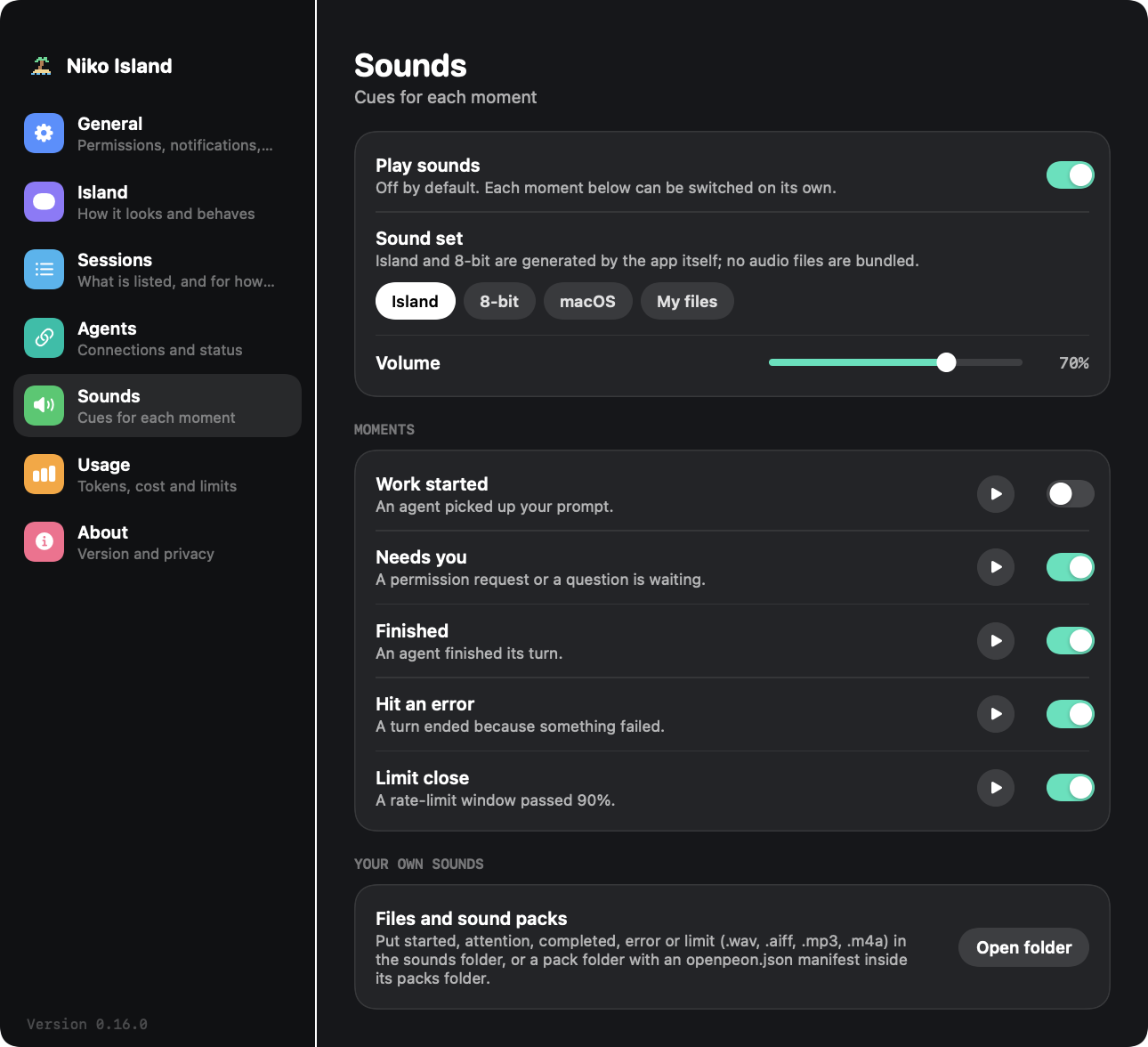
Five moments, two built-in sets, macOS sounds, your own files or a sound pack. Everything is off until you switch it on.
Usage and limits per agent
Local usage for five hours, today, seven and thirty days, plus six monthly totals. Plan limits show their reset times and pace; choose a warning threshold from 70, 80, 90 or 95 percent.
Your limits at the top
Open the island and the agent at the top of the list shows its five-hour and weekly use, coloured by how full they are, with the time to each reset. Older quiet sessions fold to one line and open when the pointer rests on them.
Permissions, explained
Turned down control of iTerm2 or Terminal, or notifications? The island says what that costs, opens the exact place in System Settings and docks a short guide beside it until the switch is on.
An installer you can trust
Scan, backup, verify and roll back on failure. The installed app can restore hooks another tool removed, only for agents you connected, with a repair backoff and an opt-out. Deliberately uninstalled agents stay disconnected.
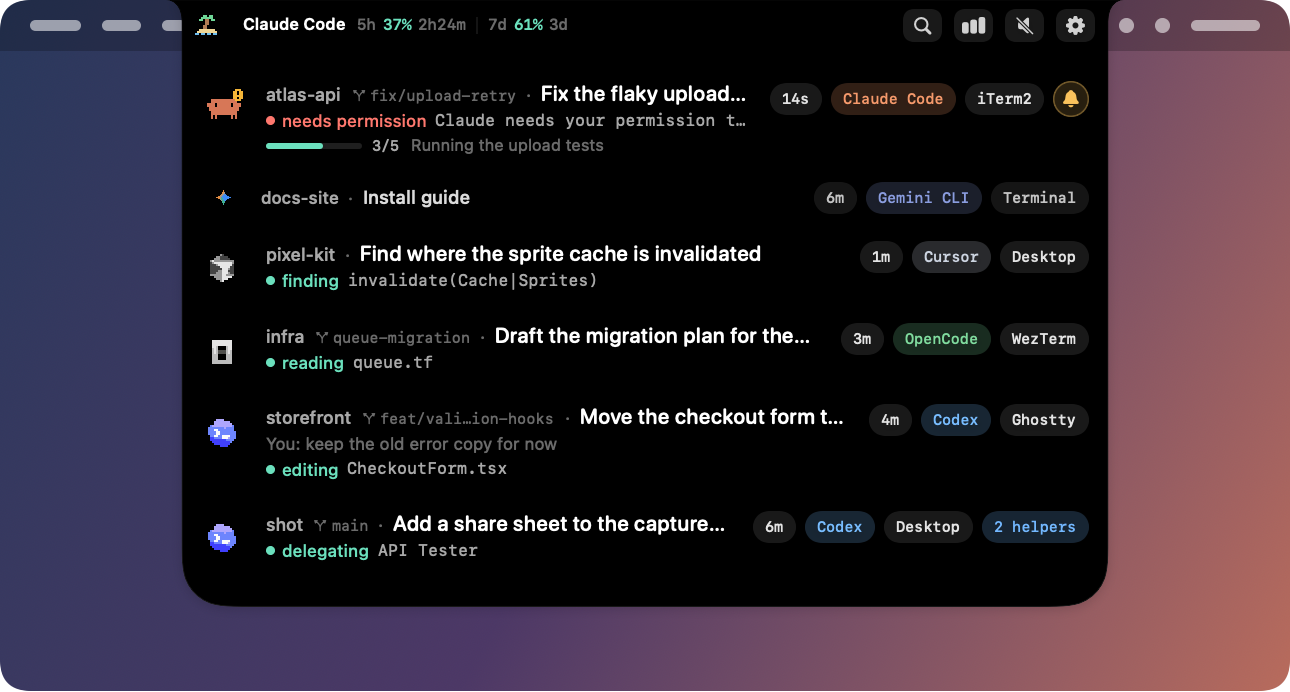
Every session, one glance
Flat rows, no chrome: the project, what the session is about, what the agent is doing this second, its last reply. The ones waiting for you carry a bell; older quiet ones fold to a line, and the plan's limits sit along the top.
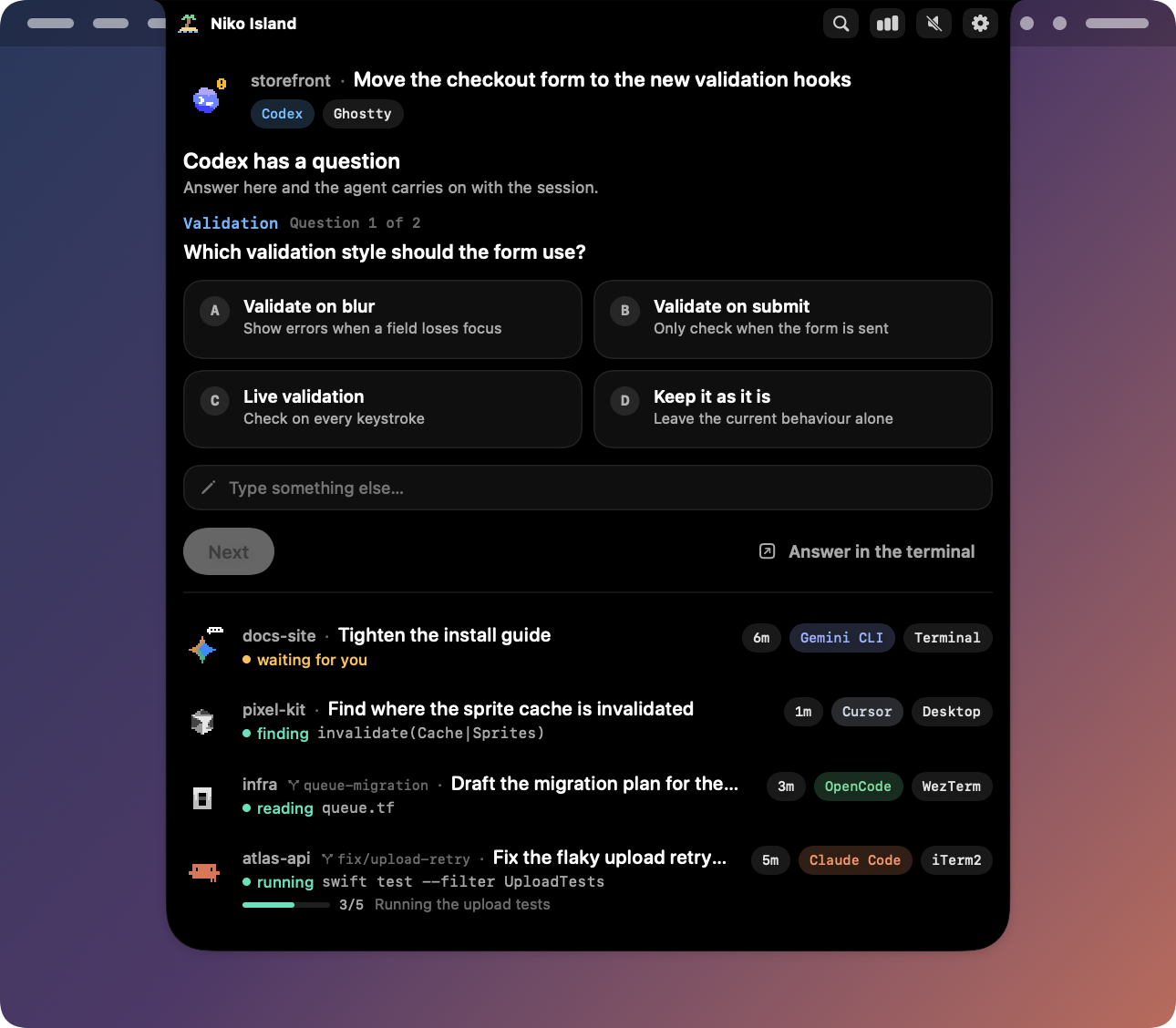
Answer without going back
A request stays on the island until you decide or the agent withdraws it. Clicking elsewhere puts the island away; it never answers for you.
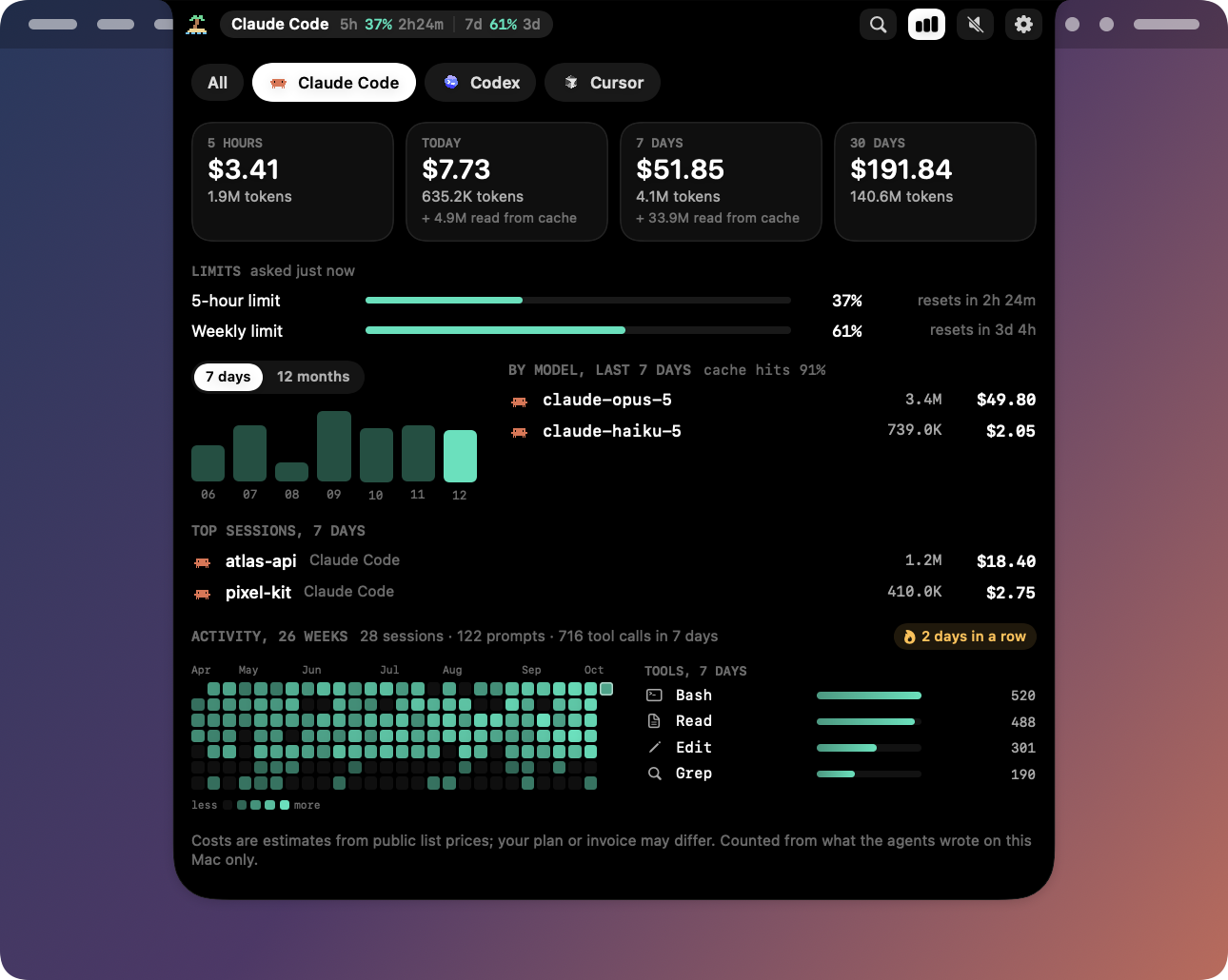
Know what each agent cost
Pick an agent to see recent usage, six monthly totals and plan limits with reset times and pace. Warning levels are configurable. Local transcript counting stays on this Mac; provider lookups are optional.
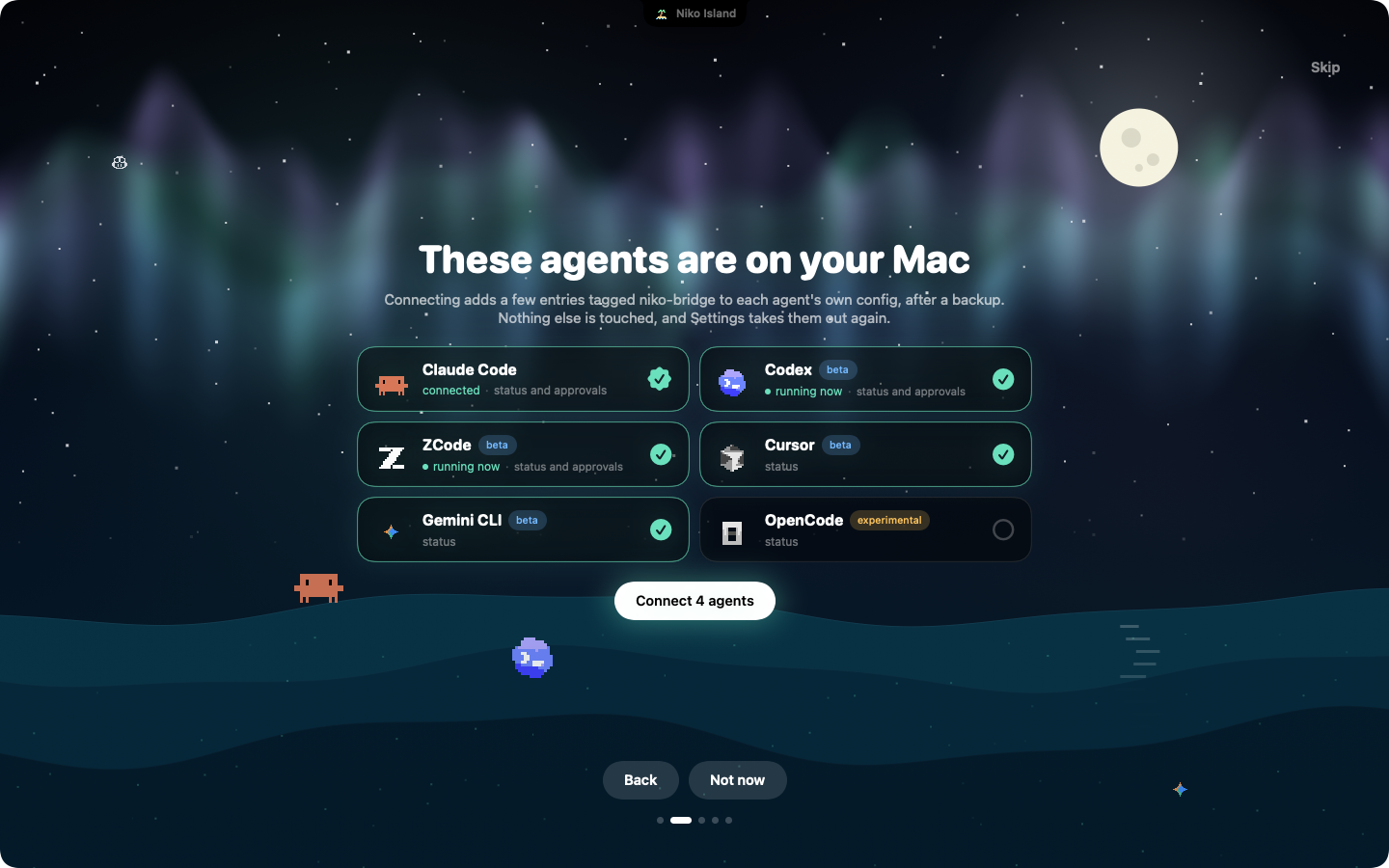
Set up before you finish your coffee
The welcome looks for the agents you have, tells you which ones are running right now, and connects the ones you tick. Skip it and nothing is touched.
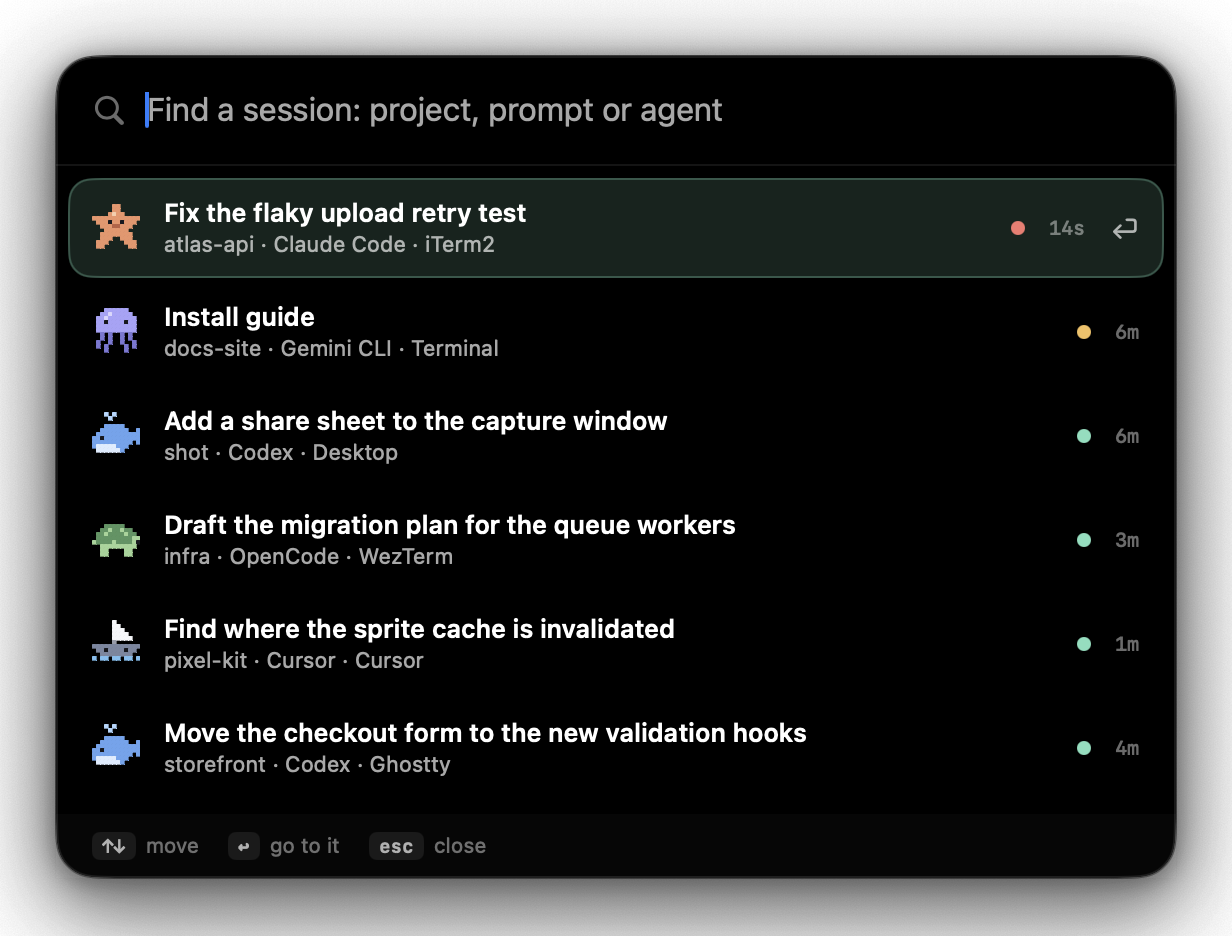
A few letters, back to work
Press ⌃⌥S, type a project, prompt or agent, then use ↑↓ and Return. Search handles accents and Chinese text; input-method candidate confirmation keeps its own keys. A waiting request opens the right card.
Island and welcome artwork is rendered by the app with sample sessions. Session search is captured from its native window with sample sessions; no personal desktop content is used.
Hear it without looking
Five moments can make a sound. The two built-in sets are a few notes generated by the app, with no audio files inside it. The buttons run the same recipe in your browser.
Work started
An agent picked up your prompt.
Needs you
A permission request or a question is waiting.
Finished
An agent finished its turn.
Hit an error
A turn ended because something failed.
Limit close
A rate-limit window passed 90%.
Sounds are off by default. Prefer something else? Pick a macOS system sound per moment, drop your own files into ~/.niko-island/sounds/, or add a pack folder with an openpeon.json manifest.
Works with the agents you run
Claude Code is supported end to end. Codex, ZCode and Devin can be approved from the island too, in beta; the others show their status. Claude Code, Codex and ZCode sessions are listed even before you connect anything.
Claude Code
Codex
ZCode
Cursor
Windsurf
Gemini CLI
Trae
Qwen Code
CodeBuddy
Factory
Grok CLI
OpenCode
MiMoCode
Copilot CLI
Qoder
Kimi Code
Devin
QwenWork
QoderWork
Kiro
MiniMax Code
Amp
Mistral Vibe
DeepSeek CLI
Pi
OpenClaw
The README lists exactly what was and was not verified, including the hands-on checks still to do.
No telemetry. No account. All local.
A tool that sits between you and your agents should be easy to check. Here is everything it does with your data.
- Nothing phones home. There is no analytics or crash reporting in the app.
- Four optional uses of the network, all off by default: a public list of model prices for the cost estimates, asking a provider for your plan's limits, a line to your own phone, and a daily question to GitHub about a new version. There is no other network code in the project.
- Owner-only local channel. Agents reach the app through a socket in a private directory, and the app checks who is calling on every message.
- Trimmed at the source, kept in memory. Tool output is dropped and long text in status events is shortened before it leaves the agent. Nothing from an event is written to disk; the usage database holds numbers and identifiers, never prompts or replies.
- Session logs are read, never changed. To list sessions and count tokens the app reads what Claude Code, Codex and ZCode keep on your disk. A title or a last reply is held in memory while its row is shown, and goes nowhere.
- A sign-in is read only if you ask for it. Switch on "Ask Anthropic" and the app sends the sign-in Claude Code keeps in your Keychain to api.anthropic.com, to ask for your limits; for Codex, the ChatGPT sign-in Codex keeps on this Mac goes to chatgpt.com; for Gemini CLI, its saved sign-in goes to Google, only while it has not run out; for Copilot, the GitHub CLI's sign-in goes to api.github.com. For ZCode, Kimi and MiniMax plans you paste a key in, kept in your Keychain. One host each, nothing renewed or rewritten, only percentages and reset times kept. With every switch off, no sign-in or key is read.
- A line to your phone, if you ask for one. Through Bark or ntfy, set up by you: which agent, which project, what kind of moment, to the one server you chose. What is being asked for goes along only if you say so. Off by default, and then only while the screen is locked.
- Hooks you can audit. Every entry the installer writes contains
niko-bridge. Search for it any time.
~/.niko-island/
├── bin/        bridge and status-line launchers
├── run/        local socket, owner-only
├── cache/      rate limits, optional price list
├── data/usage/ token counts in SQLite
├── sounds/     your own sounds, if you add any
└── logs/       redacted diagnostics
Up and running in about a minute
The app is signed with the project's own certificate but not notarized, because the project has no Apple Developer account, so macOS will not open a downloaded copy until you clear its quarantine flag once. After that it opens like any other app, and since 0.12.0 updates keep the permissions you granted.
Download the build for your Mac
Get the .dmg from GitHub: apple-silicon for a Mac with an M-series chip, intel for a Mac with an Intel processor. Apple menu → About This Mac tells you which. A .zip of each is there too.
Drag it to Applications and open it
Open the disk image and drag Niko Island onto Applications, then clear the quarantine flag with the command below. Without a terminal: on macOS 14, right-click the app and choose Open; on macOS 15 or later, try to open it once, then use System Settings → Privacy & Security → Open Anyway.
xattr -cr "/Applications/Niko Island.app"
open "/Applications/Niko Island.app"
Let the welcome connect your agents
The first launch finds the agents on your Mac and connects the ones you tick; the Agents page in Settings does the same later. Prefer the terminal? Look at the plan first: nothing changes until the second command.
# show what would change
"/Applications/Niko Island.app/Contents/MacOS/niko-island" install --dry-run --recommended
# apply it (a backup of each config is kept next to it)
"/Applications/Niko Island.app/Contents/MacOS/niko-island" install --recommended
Changed your mind?
Uninstalling removes only its own entries and restores your status line. Your agents keep working.
~/.niko-island/bin/niko-island uninstall
Or build it yourself
You need macOS 14 or later and Xcode 16 or later.
git clone https://github.com/baogutang/niko-island.git
cd niko-island
scripts/make-app.sh
open "dist/Niko Island.app"
Open, on purpose
There are polished closed-source apps for this job. Here is the honest trade if you would rather read the code.
| Niko Island | A typical closed-source alternative | |
|---|---|---|
| Price | Free | Paid license or subscription |
| Source | MIT, all of it | Not available |
| License key | None | Usually required |
| Tracking | None, and you can verify it | You take their word for it |
| Direction | Issues and pull requests | The vendor's roadmap |
| Code signing | Own certificate, not notarized: one extra step at first launch | Usually notarized |
| Agent coverage today | One stable integration, the rest in beta or experimental | Often broader |